Programmatic app retargeting is one of the most efficient ways to bring users back to your app. Written by Remerge, this guide breaks down everything you need to know about creating an effective app retargeting strategy, optimizing your mobile in-app advertising efforts, and maximizing ROI.
Contents
- What is in-app retargeting?
- What are the benefits of programmatic app retargeting?
- How does in-app retargeting work?
- Building a mobile retargeting strategy in the privacy-first era
- Measuring what retargeting actually adds: incrementality
- Best practices for ad creatives
- Segmentation tips and strategy
- Personalization via dynamic product ads
- Summary
This is the complete guide, all nine chapters, free to read.
1. What is in-app retargeting?
In-app retargeting is a mobile marketing strategy that allows you to locate and target your existing users with relevant ads. These in-app retargeting ads appear within various apps that your customers are using.
By leveraging the data you have collected about your users (which is encapsulated by their unique device ID), you can identify and retarget them with highly personalized ads to strategically address various stages of their user journey in your app.
In section 3 of this guide, we’ll take a deeper dive into the technical aspects of how retargeting works and look at the various players who make up the mobile advertising ecosystem.
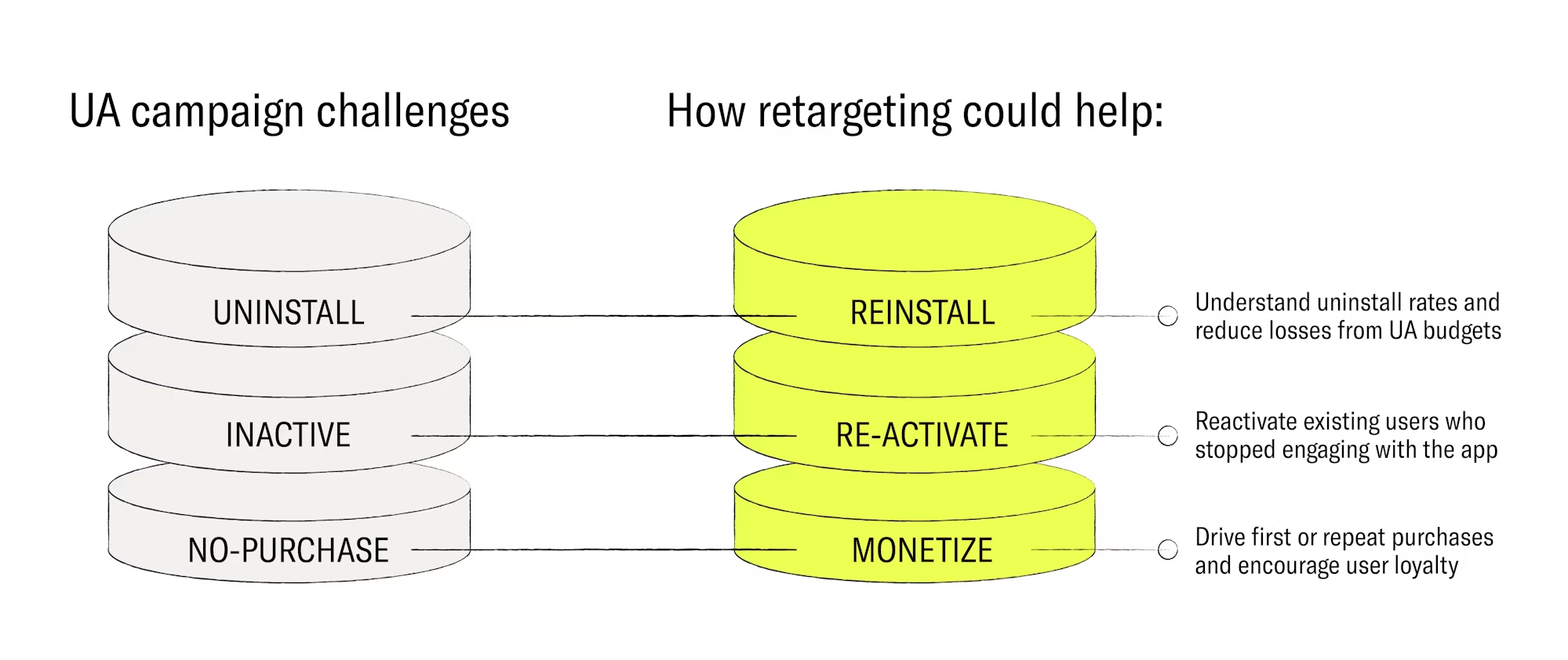
Retargeting ads help you:
- Get your newest users to complete an important action within your app, such as a registration or purchase
- Reactivate dormant users and get them to re-engage with your app or make a purchase
- Inform paying users about new app features, or upsell them with offers and promotions

2. What are the benefits of programmatic app retargeting?
If you are managing an app-based business, in-app retargeting is an essential part of your long-term, sustainable growth strategy. It helps increase your user engagement, retention, and revenue by showing tailored ads to people who have previously downloaded, used, or purchased from your app.
There’s a common misconception that marketers should not retarget newly acquired users until a much later stage in their customer journey. This idea is based on the premise that these users are more likely to convert organically, but the reality is that the vast majority of users who install an app will forget about it, and potentially uninstall it before long. We’ll dive deeper into the stats on this in the upcoming points below.
To improve retention rates, user acquisition campaigns should always be backed up by well-planned retargeting strategies from the first day that a user installs your app. This increases in-app engagement and keeps your audience consistently engaged. The chances of a new user spending money in your app and continuing to use it in the long-run are much higher when they are part of a retargeting campaign. For instance, studies show that retargeted users have an overall 152% higher engagement rate than newly acquired users who are not retargeted.
Here are the main reasons why retargeting is essential for your app’s growth:
1. Retargeting complements your user acquisition (UA) strategy
Every app growth campaign begins with UA. The launch phase of an app focuses on boosting installs, account registrations, and getting new users to enter your app. For UA, marketers want to establish a large user base and optimize their ad spend based on the cost per install. But these are not the only things to focus on when developing your app marketing strategy.
Although obtaining more users is necessary for app growth, app marketers should put plans in place to monitor whether those same users are still engaging with your app after the install. The long-term aim of any app growth strategy is to improve the lifetime value of users – so it’s key to start running your retargeting campaigns before users begin to churn.
One report found that in 2024, 46.1% of Android apps were uninstalled within the 30 days after they were downloaded – and the majority of those uninstalls took place within just 24 hours. Speaking on the topic, Ekaterina Li, Principal Account Manager at Remerge explained at the Mobidictum conference in Istanbul: “User acquisition by itself isn’t enough. Many studies show that around 90% of daily active users will churn in the seven days after installing an app, so your investment in UA won’t be worth much unless you build a robust retention strategy from day one.”
2. Retargeting maximizes the value of your existing user base
Mobile apps need a constant flow of new users to grow, but they also need retargeting campaigns to retain and nurture their existing customers. Retargeting campaigns focus on engaging customers who already have your app installed and are familiar with how it works, so it only takes a few steps to complete the actions that your ads ask of them – whether it’s finalizing their account registration within your app, unlocking a new level in a game, making an in-app purchase or completing some other conversion goal.
The first-party data you have on your users can tell you a lot about how they interact with your app. You can use these insights to build sophisticated audience segments, which allow you to create more tailored ad experiences that help you hit your conversion goals.
3. Retargeting establishes brand recall
Retargeting helps to keep your brand at the forefront of your customers’ minds – which is the first step towards retaining them. Retargeting does this by establishing brand recall, where users are familiar with your app and are therefore more likely to interact with it in the future. Continuing to make users aware of your app also increases the chances of conversion when they are ready to take action.
4. Retargeting drives revenue
Studies show that retargeted users generate on average 37% more revenue events in the first 30 days after install compared to users who have only been exposed to UA campaigns. It’s also cheaper to re-engage existing users than to acquire new ones. In fact, re-engaging existing users through app remarketing can be at least five times more cost-effective than acquiring new users.
You can also use retargeting ads to support upselling campaigns and show your loyal users the perks and benefits of spending money in your app. This is a chance to draw attention to premium subscriptions, new features, or new products within your app.
A retargeting partner such as Remerge can use your in-app data to segment your high and low-paying users based on their activity, then show them personalized ads with the offers that they are most likely to click on.
5. Retargeting improves other in-app conversion goals
UA becomes harder when your app is established or if you are operating in a saturated market, so it’s worth investing in retargeting to achieve other goals. Users are spending more time and money than ever before on their smartphones — in 2021, users in the top 10 mobile markets spent an average of 4.8 hours a day on their mobile devices, which led to a total spend of over $170 billion on the app market that year. Retargeting helps you connect with these users and guide them to the next stage of your sales funnel.
Other conversion goals could include:
- Reminding users to complete a purchase if they have abandoned their shopping cart or food order
- Encouraging users to sign up for a paid subscription after their free trial has ended
- Get mobile gamers to unlock a new character or new game level, generating engagement and loyalty for the game
3. How does in-app retargeting work?
If you’re an app business, every one of your users will have their own unique device ID. If a user has consented to cross-app data sharing (which we'll discuss further in chapter 4), their device ID can be used to track their activity across the other apps they are interacting with. If these other apps offer ad placements within their platforms, you can advertise your own app there to retarget your existing users. The ability to show your ad to one of your users within someone else’s app is made possible by a few different parties:
Key players in programmatic mobile advertising
1. Advertisers
This is you, an app-based business looking to advertise your app's products or services via ad placements within someone else’s app.
2. Publishers
Apps who offer ad space within their platform and make it available to advertisers are known as 'publishers' because they host and publish the ads.
3. SSPs
Supply Side Platforms, or SSPs, work with the publishers. The SSP’s job is to help the publisher apps sell their available ad placements. When the publisher app has the opportunity to show an ad to a specific user, the SSP is informed about who the user is and what type of ad placement is available. The SSP then puts the ad opportunity (aka bid request) up for auction to the highest bidder.
4. DSPs
A Demand Side Platform or DSP (such as Remerge) is the advertisers’ mobile advertising partner. The DSP acts as the connection between you as the advertiser, and the SSP who sells the ad placements. The DSP bids on the ad placements that the SSP sells for the publisher app, and sends the SSP a ‘bid offer’ along with the advertisers' ad creatives and copy. If the DSP wins the auction for you (as the advertiser), the SSP will send your ad content directly to the ad placement within the publisher’s app where your user will see it.
5. MMPs
A Mobile Measurement Partner (MMP), also referred to as the attribution provider, works with all of the above parties as an objective, third party who is responsible for measuring and attributing ad performance. They work with the SSPs to measure how the ads performed on the publishers’ apps. They also work with you as the advertiser, (and your DSP), to record the actions that a user took after clicking your ad and landing in your app.
An overview of how retargeting works:
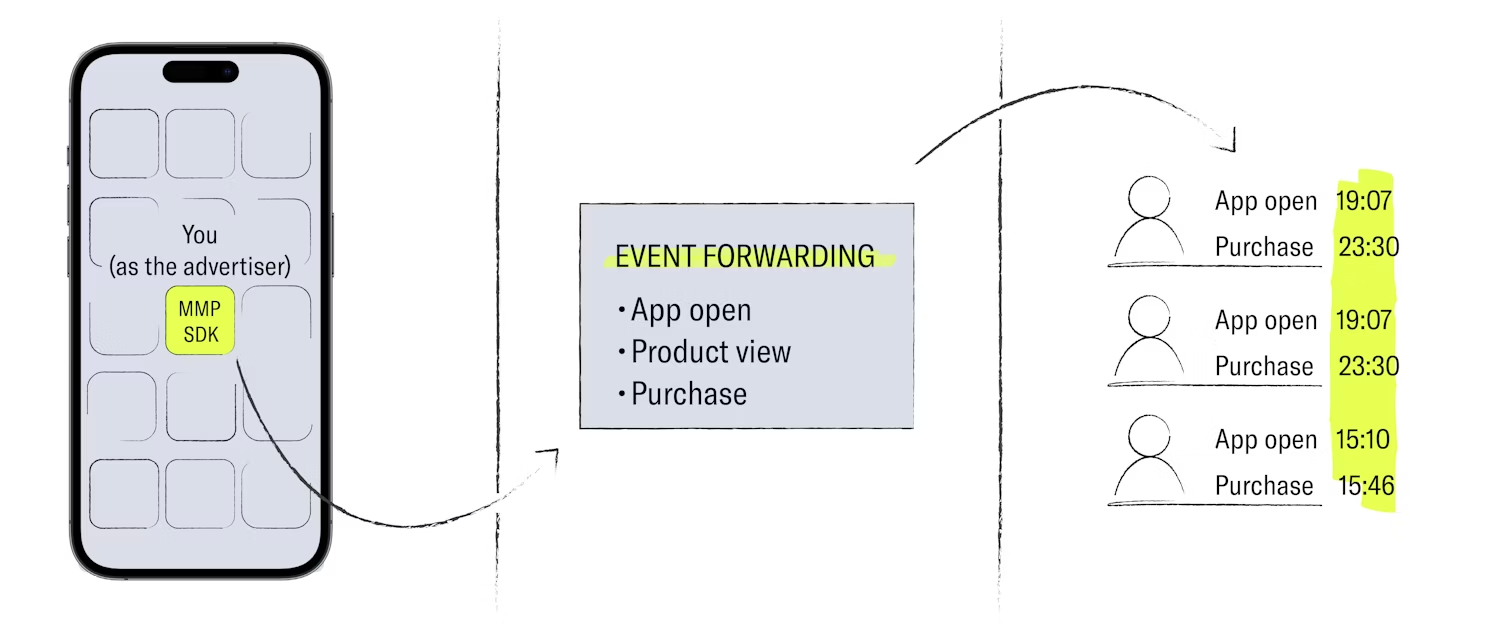
The retargeting process starts when a user downloads your app. The first session is recorded once they open your app and their device ID is known. In partnership with an MMP, (the entity that acts as an attribution provider), you’re able to gather data on what your users are doing in your app. This data is sourced from your app’s event stream. User actions and events that are tracked within your app may include:
• The products or services they have viewed or purchased
• Whether they have started a subscription or registration workflow (and how far they got in the process)
• Which level they have reached in a game
You can then send this data to your retargeting partner (DSP), who will work with you to build a customized retargeting strategy.
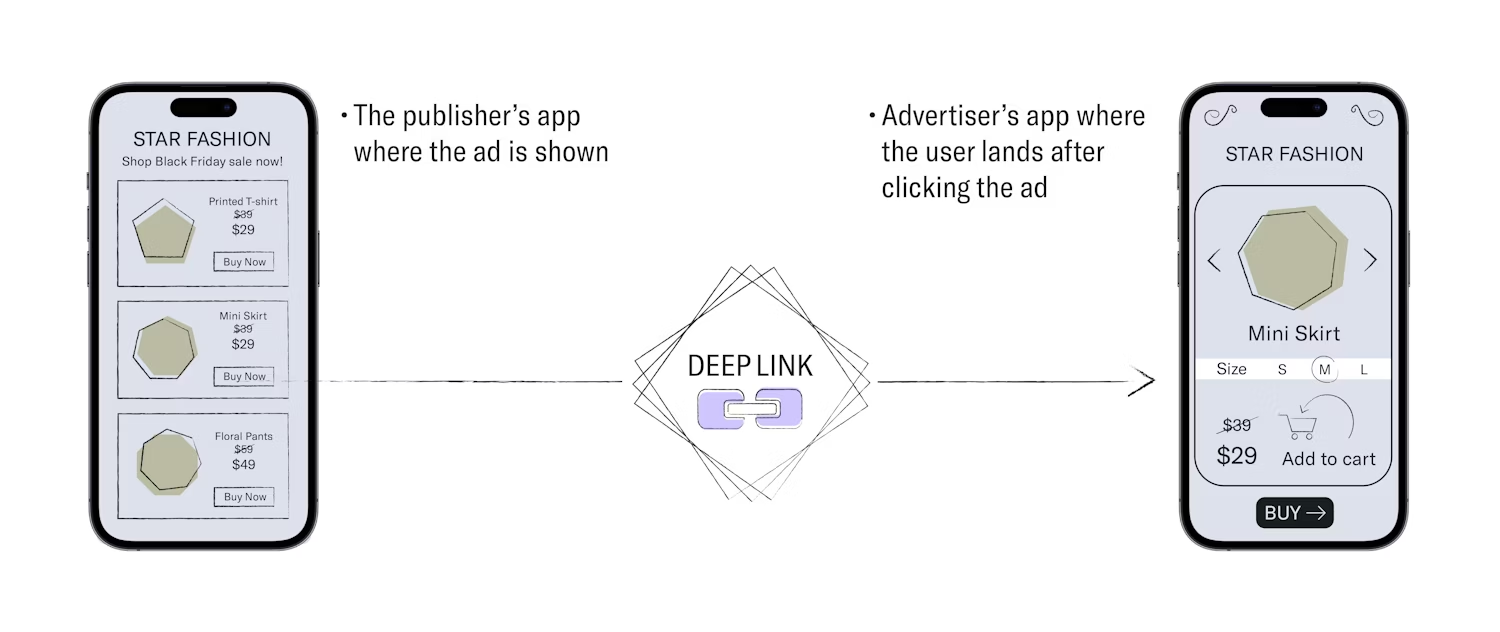
Your retargeting partner will analyze the event stream you share with them, build user segments based on your campaign goals, and then use a network of SSPs to show ads to your target users while they are spending time in other apps. These ads will feature a call to action and a ‘deep link’ which, when clicked, will bring users to exactly where you want them in your app – whether that’s getting them to perform an action like completing an account registration, or simply making a purchase.
Your app must work with an MMP for this retargeting process to work. The MMP will collect the in-app event data for you and share it (in the form of postbacks) with the DSP. Your chosen DSP will use this data to improve user segmentation based on your campaign goals.
Retargeting, step-by-step
Let’s take a closer look at the basic steps involved in running a retargeting campaign:
STEP 1: Open event stream
Enable event forwarding with your DSP partner. This is usually done via the MMP’s dashboard. You must also integrate the MMP’s software development kit (SDK) – a piece of code that’s added to your app so that the MMP can send you performance data. This step allows your chosen DSP to receive data for all of your users’ in-app events and creates user profiles based on this data.
STEP 2: Ad creatives and deep links
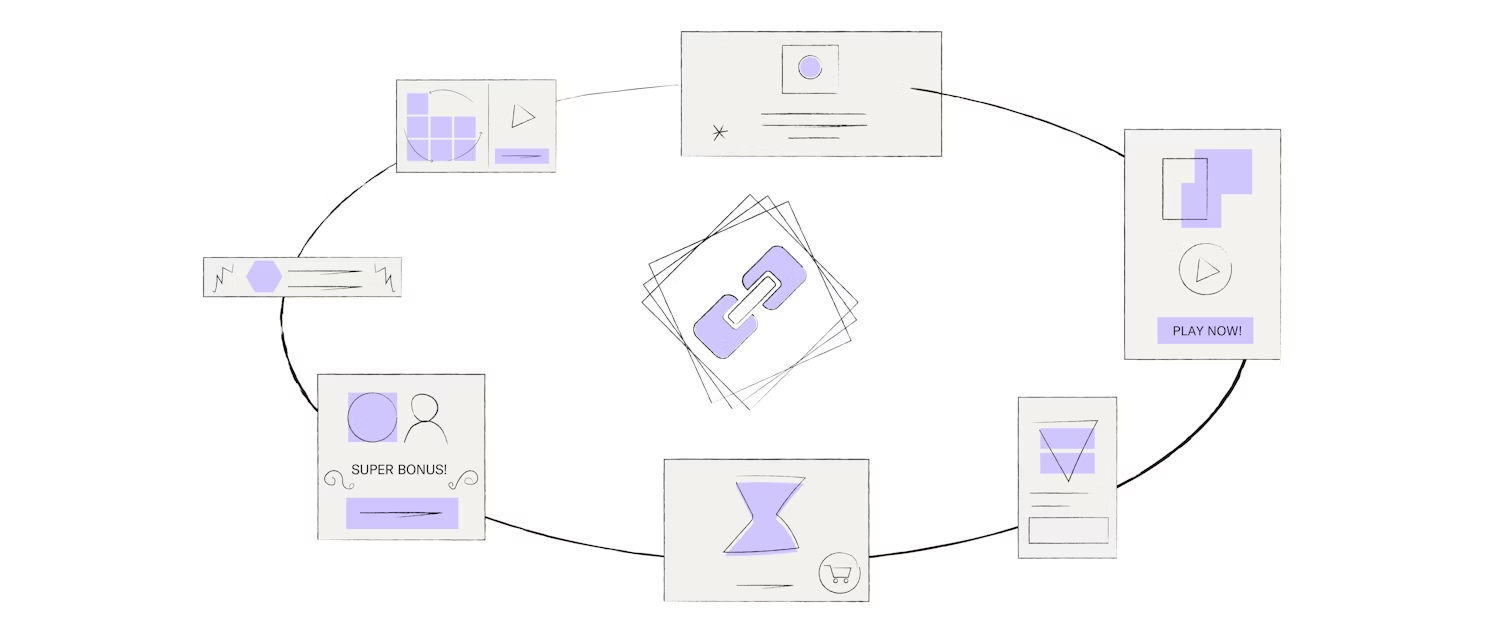
Once your event stream is open, you’ll need to provide your DSP with your ad creatives, which they will submit when they bid for in-app ad placements. (We’ll discuss the bidding process in step 4). You’ll need to strategize with your DSP about which kind of ads you want to run (banners, video, etc.) as this will determine the size and format of your ad creatives. You can design your ad creatives yourself, following the DSP’s recommended guidelines, but some DSPs such as Remerge have experienced in-house creative teams that are happy to do the design work for you.
You’ll also need to provide your DSP with deep links for each campaign. These are links that will take users to a desired location within your app, when the users clicks through the ad.
STEP 3: Segmentation
Now it’s time to define which users you want to retarget. Your DSP uses a unique set of rules to group users into segments (sometimes called audiences). For example, one campaign can target previous purchasers and another campaign can target non-purchasers. You can plan your targeting strategy together with your DSP.

STEP 4: Real Time Bidding (RTB)
SSPs have their SDK integrated into thousands of apps that want to generate ad revenue by offering ad placements. When an in-app ad placement is available, the SSP notifies many competing DSPs with details of the user who will see the ad. The DSP will look at the user's data and, in the case of retargeting, they will see if the user is in one of the segmentation lists that they created previously with the you as the advertiser.
From there, a virtual auction will take place in which the DSP bids for the ad impression – or rather the opportunity to show an ad to a user. The 'bid offer' also contains the advertisers' ad creatives and copy which the DSP deems to be most likely to convert the user. Bids are made via real-time bidding (RTB) and the entire process occurs within just fractions of second because every step is governed by intelligent computer algorithms.

STEP 5: Winning the ad placement
Your DSP’s goal is to bid high enough to win the ad placement, while still bidding low enough to drive return on ad spend (ROAS) for you as the advertiser. If your DSP wins the ad impression, the SSP will show your ad to the user. It’s the user’s choice to click the ad or not. If the user clicks on the ad link (i.e. a deep link), they will be taken directly to a certain part of the advertisers' app.
STEP 6: Measurement
Information about the ad being shown, watched, and possibly clicked, is sent to the DSP. The DSP sends this information to the MMP, who tracks all events and actions that the user takes within your app after the ad click. The first in-app event after the click is the re-engagement event. The MMP can then attribute certain events to the ads and to the DSP who placed the ad.
According to the agreed attribution window (a specific time period whereby a DSP can take credit for a click or impression they generated), your retargeting partner will compile all post-click in-app event activity data for analysis and reporting. Most importantly, your retargeting partner will observe how much money users spend in your app after engaging with your ad.

4. Building a mobile retargeting strategy in the privacy-first era
As you’ve read in the last few chapters, in-app retargeting relies on the sharing of user data between several different parties. In recent years however, consumers have become more conscious of how their data is used and shared. As a result, consumer demand has paved the way to a new, privacy-first era of retargeting. Tech companies like Apple and Google, who design and run the operating systems on our mobile devices, have responded to these needs by implementing new measures that protect user privacy.
However, Google's Android devices and Apple iOS devices are tackling the privacy topic in very different ways:
Privacy on Android
The Google Advertising ID (abbreviated to GAID), is the unique ID that is assigned to every Android device. It is used as an identifier under which a user’s cross-app behavior is tracked and collected for retargeting purposes. Currently, Android users can manually disable their GAID which would prevent advertisers/DSPs from tracking users across other apps they use. It would also hinder advertisers and DSPs from being able to retarget these users on an individual level with personalized ads.
However, because disabling the GAID is something that users must actively change in their settings, most do not – so the majority of Android users can still be effectively retargeted by advertisers. In fact, by the end of 2022, Android accounted for 72% of all mobile operating systems and was the source of almost 200 billion bid requests per day, so retargeting on Android remains very accessible.
In recent years, Google made plans to deprecate the GAID and build a privacy-safe advertising framework for Android called the Privacy Sandbox. This framework would allow advertisers to continue running retargeting campaigns effectively, without the user’s personal data leaving their device – thus preserving their privacy. As of 2025 however, Google has put this initiative on hold and it remains unclear as to whether they will proceed with it in future. If you're still interested in the initial plans and work that went into this initiative prior to 2025, you can learn more about it here.
Privacy on iOS
In 2021, alongside the iOS 14.5 update, Apple further enhanced its user privacy and data security policy by letting iOS device users decide whether or not they want to be tracked across the various apps they use. Apple called this initiative ATT (the App Tracking Transparency framework) which pops up as a consent prompt when a user opens a newly-downloaded iOS app. The ATT prompt requires the user to opt into or out of cross-app tracking.
The introduction of this feature means that Apple's unique device IDs (known as the IDFA or Identifier for Advertisers) are withheld from advertisers unless the user opts into cross-app tracking. As was to be expected, many iOS users are opting out of cross-app tracking because it’s easy to do so – and without an IDFA, advertisers/DSPs cannot track and locate specific users across other apps, which makes retargeting impossible. The absence of cross-app behavioral data also means that iOS ads cannot be highly-personalized to the individual user. Following the announcement of these changes, the market perception was that mobile retargeting would become obsolete. The reality, however, has not been as bleak.
While iOS retargeting has taken a hit, iOS opt-in rates vary widely by app category and region, and enough users consent that there are still plenty of opportunities to run retargeting campaigns. What’s more, iOS users are usually bigger spenders than Android users, so even though it’s a smaller audience for retargeting, they still have great revenue potential. It’s also worth noting that on any given day, well over half of all available iOS ad opportunities (aka ‘bid requests’) are ID-enabled, so retargeting your users on iOS remains possible.
While iOS traffic remains available, mobile marketers are capitalizing on the opportunity to maximize the lifetime value of their customers and boost revenues by re-engaging their existing app users on iOS.
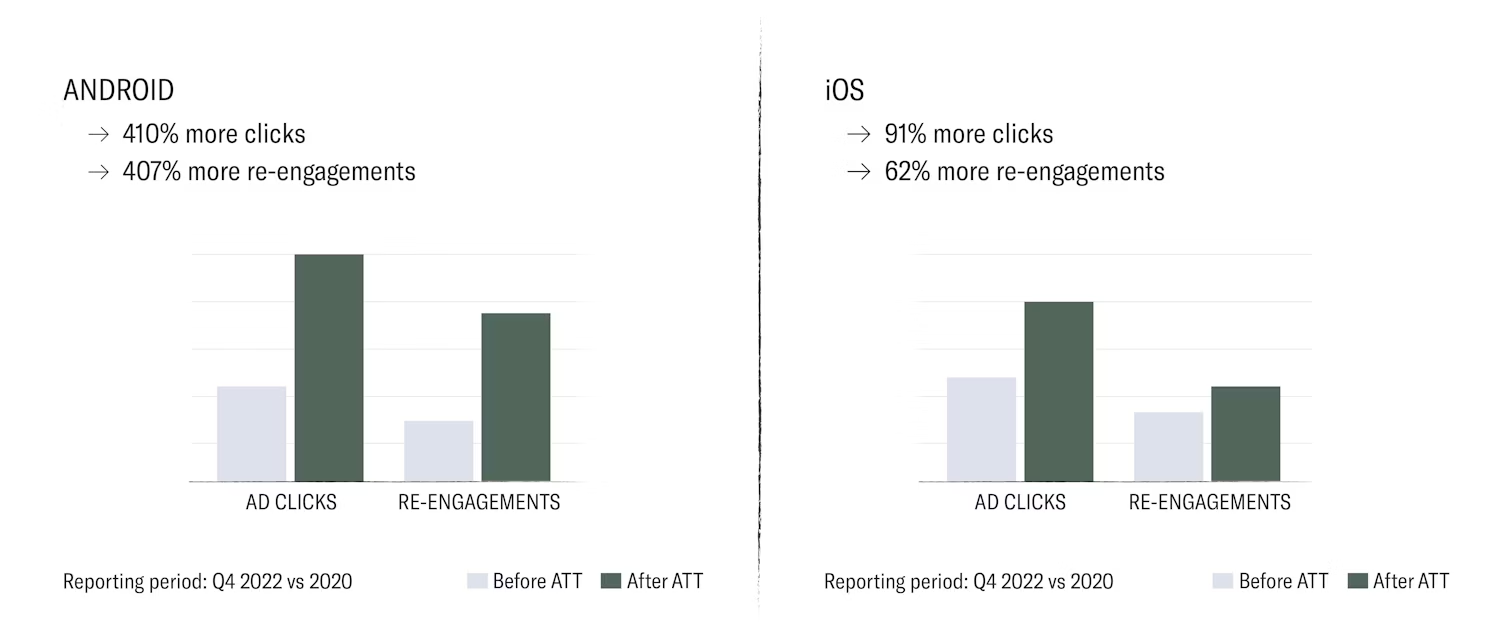
Below you can see Remerge’s performance since the rollout of Apple’s ATT framework. You'll see that the sheer volume of today's mobile usage is still driving more ad clicks and engagement than ever, despite the new privacy developments.
5. Measuring what retargeting actually adds: incrementality
A retargeting campaign can report strong attributed results while contributing little additional revenue, because some of the users it reaches would have converted anyway. Incrementality measurement answers that question directly, and it is worth understanding before you evaluate any partner or channel.
Why incrementality matters
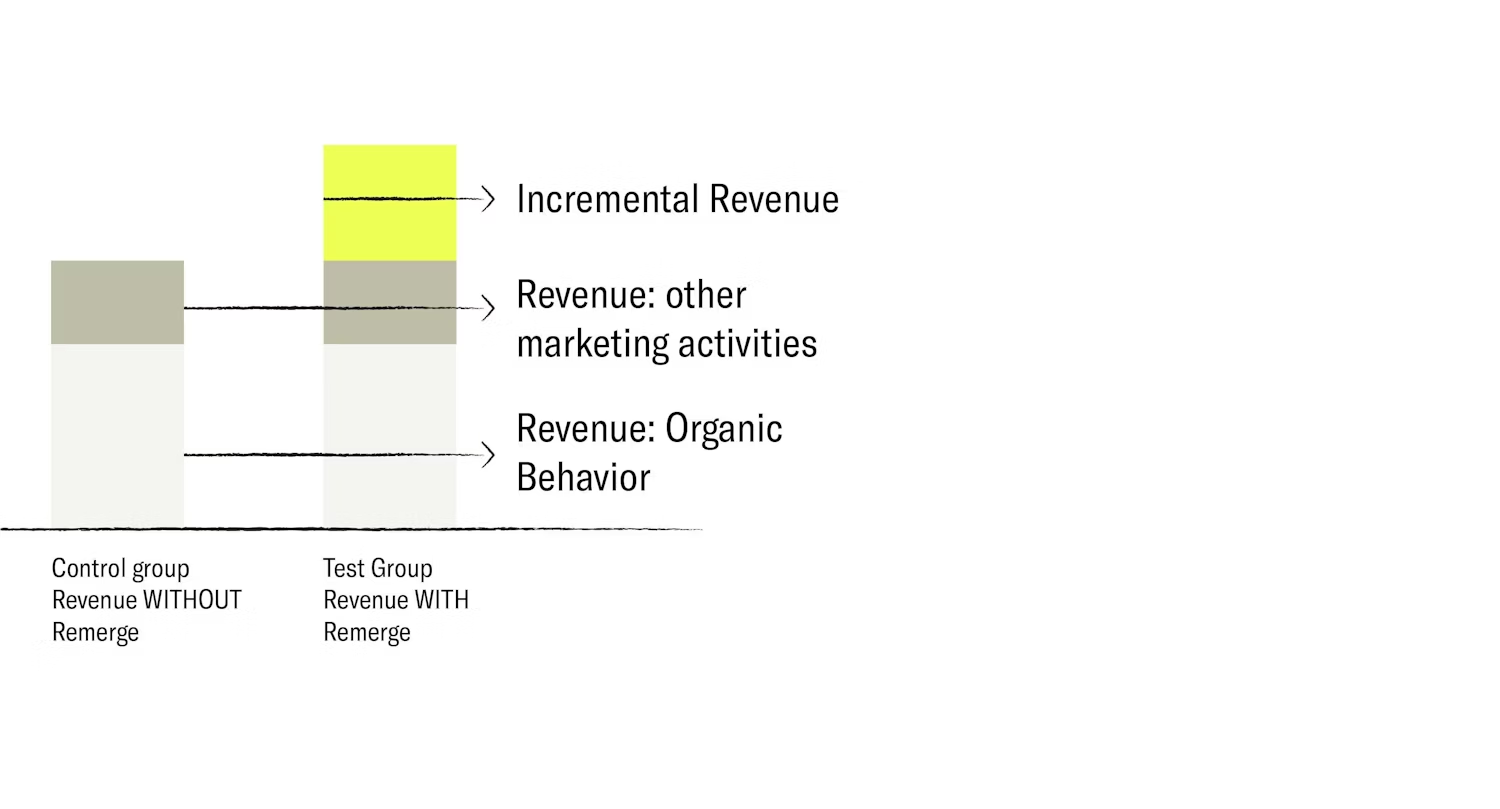
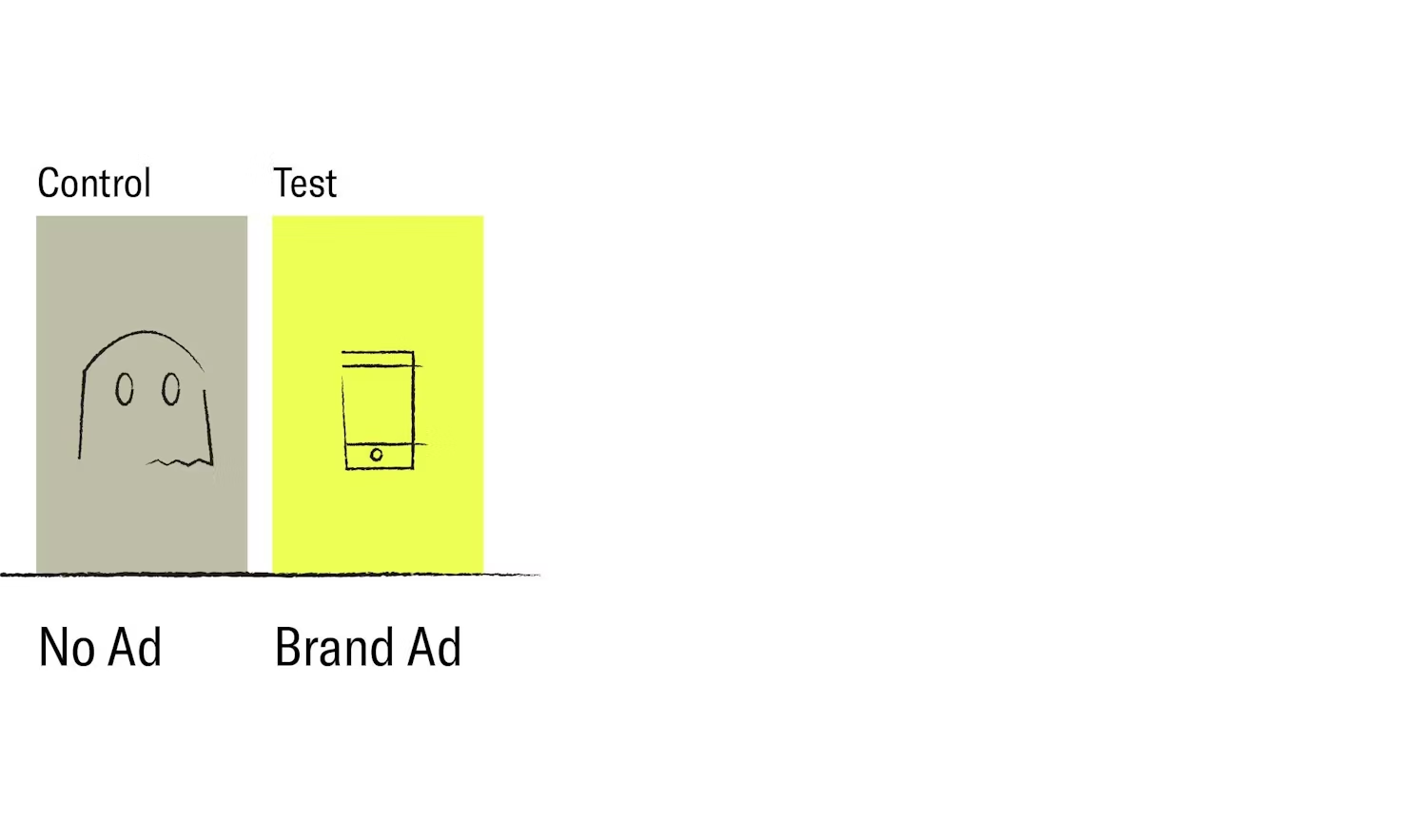
Incrementality measurement is the process of segmenting users into two control groups, where one of the groups is targeted with a paid marketing campaign and the other group receives no marketing communications at all. The results from this will help to distinguish the impact that various paid advertising channels have on your users. If your goal is to measure in-app purchases over a certain period, the total purchases from the untargeted group would reflect your organic conversion rate, whereas the total purchases from the targeted group will show you the conversion rate of your paid campaigns. This helps you to assess the overall effectiveness of an advertising channel and it allows you to make more informed decisions concerning your ad spend.
The adoption of incrementality to assess the true impact of an app marketing campaign has grown in recent years, and this is expected to continue as advertisers experiment with different ways of measuring and verifying attribution in a landscape where device IDs are less available than they used to be. For this reason, it’s useful to consider a DSP that has experience with incrementality testing, in order to understand and optimize the effectiveness of your ad campaigns.
Privacy and data security
Data privacy has been a major concern among smartphone users and has led to the implementation of laws such as GDPR and CCPA. The fines for mishandling personal data can be huge, so it’s important to work with a trusted DSP that acts as a data processor – the highest level of data protection under GDPR. This role guarantees the safety and security of your data, and safeguards against it being used for other purposes.
6. Best practices for ad creatives
If you are building your own creative assets for retargeting campaigns, regardless of the mobile operating system, it’s important to consider the fundamentals: design and format, copy, and value proposition.
1. Design and format
Mobile ads should be easy to understand at a glance. It’s important to have clear and simple design elements such as contrasting colors and bold CTA buttons. The design of your ad should also be visually aligned with what the user sees when they click through the ad as this helps to create a cohesive ad experience.
Heavily used advertising assets should not be repurposed for your in-app retargeting campaigns, but rather custom-made with retargeting in mind. This will reduce ad fatigue and ensure optimum ad performance. It’s worth creating several different ads in multiple formats and then running A/B tests to find out which creatives, which formats and which media types convert most effectively.
The example on the left is a user acquisition ad. It contains visual hints of the app download process by showing ratings, comments, previews, etc. The example on the right is a retargeting ad. It uses some interface elements from the app itself.

2. Copy texts and arrangement
When creating your ads, it’s important to use copy that is compelling in its messaging but also functional in the way that it is displayed. Copy texts should be short and easy to understand. Below are two ways you can use ad space, call-to-action buttons, and messaging to make your ad creatives more eye-catching.
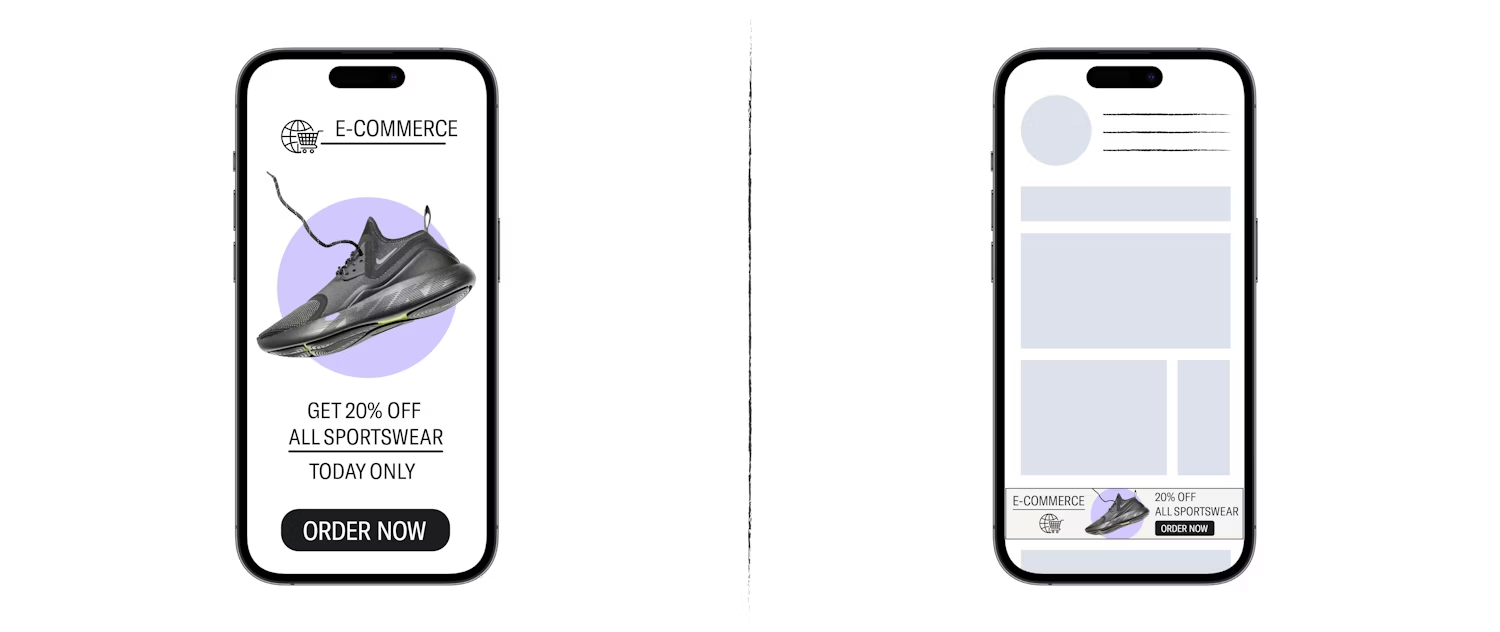
The example above on the left shows a full screen ad that makes strategic use of the available space. The call to action is direct and self-explanatory. The example on the right shows a smaller, banner-style ad that is part of the same campaign. The copy has been reduced to accommodate space constraints.
3. Value proposition
A strong value proposition (or value exchange), is the best way to engage your users. It’s crucial to think about the rationale behind the goal of your ad – and also to consider what your audience’s motivations and mindsets are. Providing them with real value and presenting your message with a sense of exclusivity or urgency (like special events, time-limited offers, free gifts, discounts, or new content and features), can encourage your users to click on your ads. The example below highlights how you can incentivize a user to take action.

7. Segmentation tips and strategy
Segmentation is the process of organizing users into separate groups, based on certain attributes that they have in common – or certain actions that they have taken within your app. These groups (or rather segments) can then be individually targeted with relevant ads and messaging. You can work with your retargeting partner on the segmentation of your users and then measure the performance of your ads for each segment. The results can be used to adjust and optimize your campaigns moving forwards.
Typical segmentations you might use could include:
1. First-time buyers:
These are users who have installed your app but not made any in-app purchases to date. In this case, the goal for your ads would be to get your users to make their first purchase in your app. This can be done by using incentives, offers, or product features to encourage them to convert.
2. Active users (or active previous purchasers):
Users who have made at least one in-app purchase in the last 30 days. This qualifies them as customers who are still ‘warm’ or somewhat interested. The goal for this segment is to increase the frequency of purchases per user. For example, if you are a food delivery app and have a customer who usually places an order once a month, the aim might be to increase their order frequency.
3. Churned users or lapsed previous purchasers:
Users who have not been active for a given time frame, e.g. their last order or purchase was over 30 days ago. These users are slowly fading away, and if not retargeted, will likely abandon your app. The goal is to bring churning users back to make purchasers so they don’t forget about or uninstall your app.
8. Personalization via dynamic product ads
Dynamic Product Ads (DPAs) show users personalized ad content based on what they have done within your app. It's not just the ad as a whole that is personalized for the user, but even individual elements of the ad, such as the ad creatives, the ad copy and the CTA message. DPAs are particularly effective for e-commerce and shopping apps that sell various products.
DPAs with deep links help direct users to exactly where you want them to end up in your app. This could be their shopping cart where they’ve added items but not yet purchased them, or your app’s product catalog where the user is shown items that they’ve previously viewed. These ads are created in real-time, where an ad template is populated with images and product information from your product catalog.
Here are the steps behind the creation and publishing of a dynamic product ad:
1. You enable event forwarding from your app (chapter 3, step 1)
Your retargeting partner collects information from your data stream about how your products are viewed or used.

2. Your retargeting partner creates the ad
Your retargeting partner will then take the information gained from your event stream to create an engaging and personalized ad for a specific user, based on the items from your product feed. From there, they will create a custom HTML ad for each unique user.
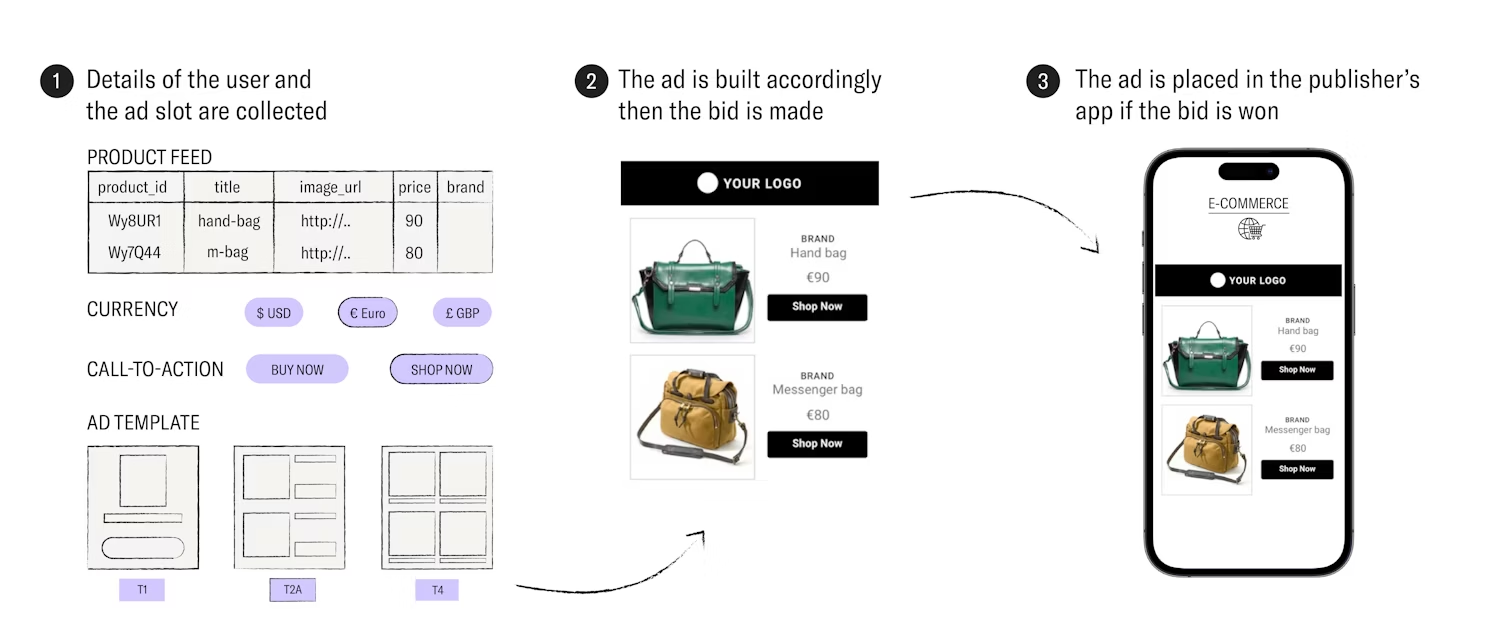
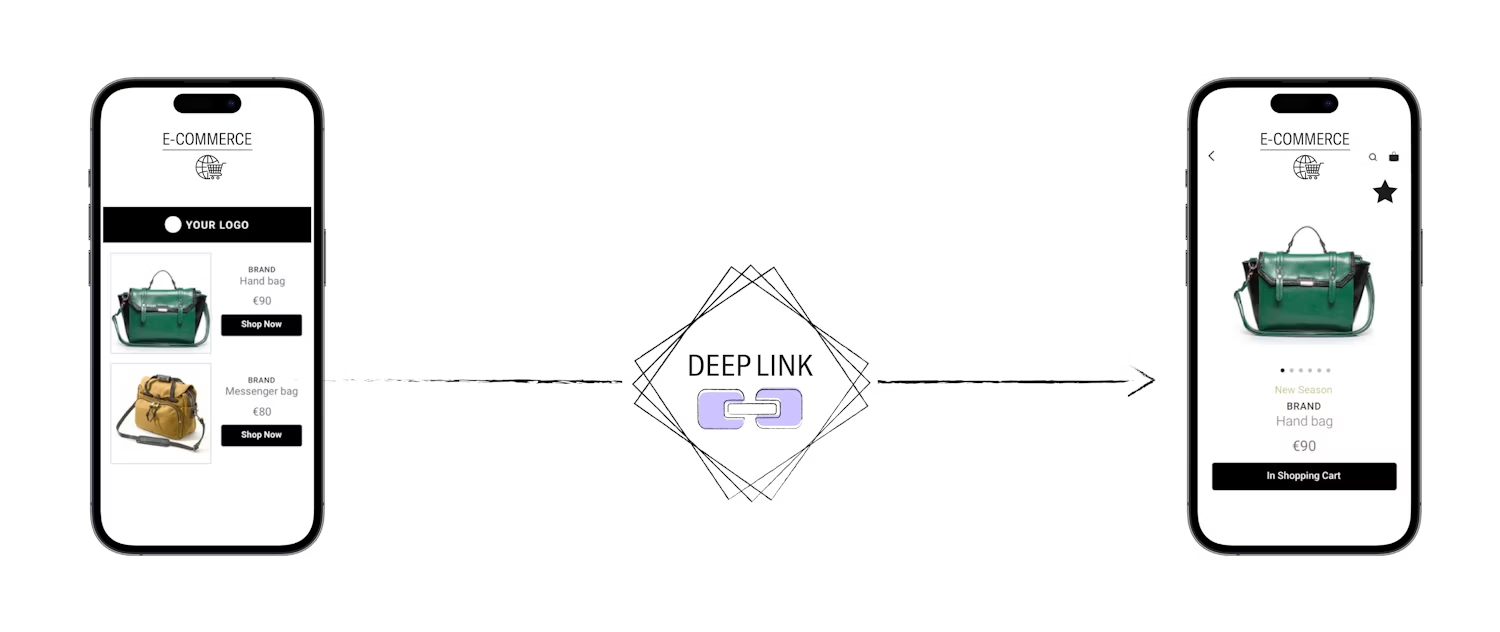
3. Your retargeting partner inserts the deep link you provided
Once the user clicks on any of the products displayed in the DPA, they are directed to a specific product page in your app via the deep link.
9. Summary
Overall, in-app retargeting is essential for growing your app and building a successful mobile marketing strategy. User acquisition campaigns bring in new users, but retargeting is necessary to drive retention and revenue after the install. A small investment in retargeting means much bigger rewards in the long term.
Working with the right partner is also key. Be sure to partner with an experienced and privacy-safe DSP who can support you with the technical setup requirements, audience segmentation, creative ideation, and strategy. This way, your retargeting ads won’t just reach your users, but re-engage and convert them too.
If you’d like find out how Remerge can help you achieve these goals, get in touch with us here: https://www.remerge.io/get-in-touch